Today I was debugging Access and was working in some complex code that iterated over a large number of records. I wanted to stop at a particular record and run through it step by step. The record could be identified by using the RS variable which represented a DAO Recordset object when the Order_ID field it was looking at was a certain ID. Something like 42924 in my case.
Although I haven’t used it much before, I was aware of the VBA Watch functionality and decided to use it.
So before I opened the form record, I went the routine I wanted to check out in the VBE editor and put the cursor inside it. Then I went to the Debug menu and chose Add Watch…
I filled out the dialog there with something like this:
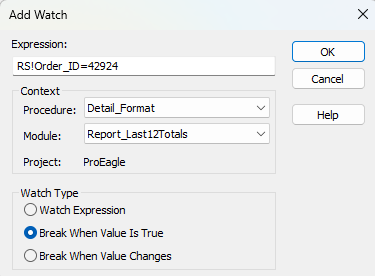
Then I clicked on OK. In my watches window I saw the line representing my watch (you can pull it up if you don’t see it by clicking on View -> Watch Window)
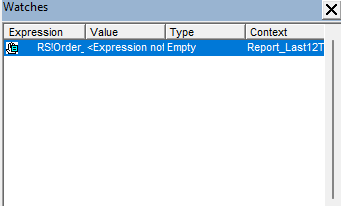
Then I set my form in motion. Sure enough, when it hit my order_ID it brought up the code for that function at the point the recordset’s record with that ID loaded and I was able to easily step through the code to see what it was doing.
This is a handy feature if you have a lot of code that loops through things and you want to just check a specific instance of the loop. Like if you are looping through all the controls on a form for example and you have problems with the handling of a particular control, you could set a Watch to break on the name of the control being the control you are looking for.